ERP UI/UX design services for B2B software
ERP UI/UX design for companies building ERP, MRP, MES, WMS and QMS software. We design and redesign workflows, data-dense interfaces, modules and design systems for planning, inventory, costing, quality, purchasing and shop-floor operations. ERP engagements often continue beyond the initial product or redesign into new modules and features.
ERP modules we design
An ERP runs the operations of a whole company, and the companies differ. Assembly, food production, services, clinics and distribution all keep the same modules and use them differently. We design across the full suite and on single modules inside a larger system.
Manufacturing, planning and scheduling
Work orders and job templates, sitting on demand, capacity and the calendar. Costing belongs here too — the planned number on the card and the actual one that comes back from production. This is the layer that decides whether the ERP runs production or gets worked around.
Quoting, RFQs and customer portals
Where the job starts: a request arrives, gets priced, and becomes a quote. Often the only part of the ERP an outside party ever sees, so it gets judged like a product rather than an internal tool.
Sales orders, customers and vendors
A quote converts into a sales order, and both sides of the relationship hang off it — customers on one side, suppliers and vendors on the other. Two different jobs that most systems squeeze onto one screen.
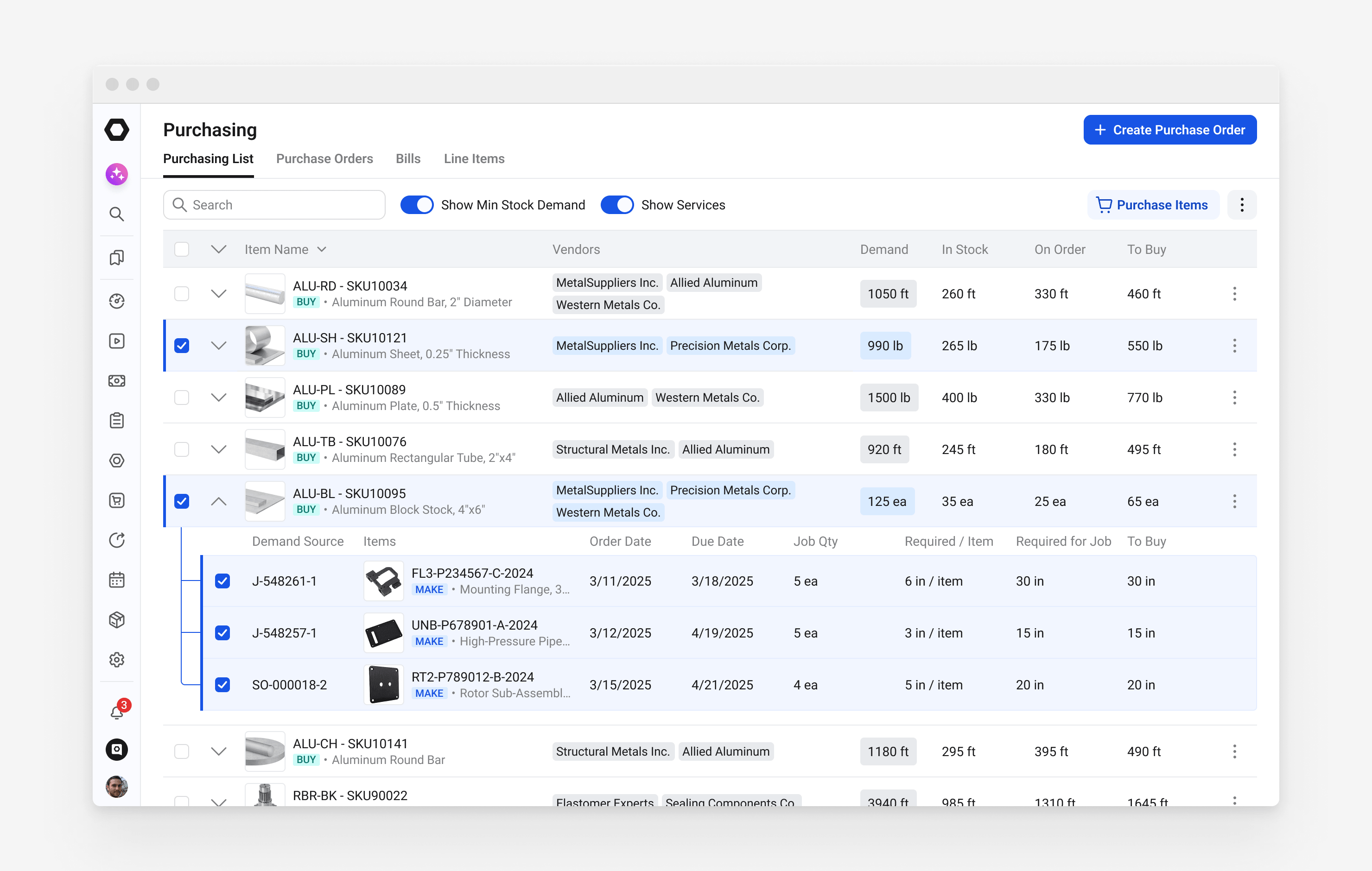
Inventory, materials and purchasing
Stock levels, purchase orders, suppliers and receiving. Long tables, partial data and decisions taken in seconds, often by someone on their feet at a shared terminal.
Fulfilment and shipping
What was promised, what actually ships and when. A pick-and-ship flow and a pick-pack-ship one need different screens, and a pick list built per order or per item — discrete and batch picking — decides what the screen leads with. Partial shipments, backorders and FIFO or FEFO allocation stay tied to the sales order, and the packing slip has to match the box.
Quality and compliance (QMS)
Quality controls, lab checks and the multi-step work instructions an operator follows and signs off, tied back to the work order they belong to. The evidence has to be captured as the work happens, not typed up afterwards.
Warehouse management (WMS)
Locations, storage, movements and stock counts. It can be a module inside the ERP or its own product beside it; either way it lives on a scanner as much as on a screen.
Finance, accounting, invoicing and billing
Invoicing and reconciliation once the work is done. A wrong number here is expensive, so reversibility and confirmation shape the screen more than speed does.
Reporting and dashboards
The same data read back — by a planner at the start of a shift, by a manager at the end of a month. Numbers arrive from every module at once, so the screen has to say what period it covers and when it last refreshed.
Settings, roles and configuration
Permissions, custom fields, units, tax rules and the per-tenant settings every customer wants different. The part of an ERP that grows fastest and gets designed last, until an admin cannot find anything in it.
ERP UI/UX design principles we work by
The markers below separate an ERP people work in from one they work around, and any vendor can be held to them.
Every role sees what it owns and what it may do
A planner, an operator, a supervisor and an auditor open the same record and need different things from it. ERP UI/UX design decides role and tenant in the layout, well before a permissions screen somebody visits once.
A new user reaches the routine path without a walkthrough
A dense ERP screen stays legible on first read when hierarchy, grouping and contrast carry the data. Someone competent at the job reaches the routine path unaided, and that path is still the fastest one a thousand repetitions later.
The software fits how the business actually works
Two companies on the same ERP run different processes, and so do the terminals, desks and handhelds they run it on. ERP UX follows the process that exists rather than the one a diagram would prefer.
One source of truth, extendable by your team
The design system behind an ERP holds components, tokens, states and usage rules in Figma, with a handoff detailed enough for engineering to build dense screens from. New modules land inside the system, and additions never start a second one.
Compliance shapes the flow from the first concept
Regulatory and audit requirements shape ERP interface design from the first screen concept, where they still cost nothing to accommodate. The record then builds while the work happens, instead of arriving later as a reporting module nobody can navigate under pressure.
Integrations show what is fresh and what failed
An ERP almost never holds all the data it shows. Records arrive from a CRM, a warehouse system, a bank feed or a supplier portal, each on its own schedule and in its own format. The screen has to mark what is current, what is out of date and what failed to sync, so nobody commits to a number that stopped updating days ago.
ERP workflow and process design
No two companies run the same process, and the ones worth designing for split, merge and double back. An ERP built on a straight line pushes those exceptions into email and spreadsheets, which is where the cost quietly goes. We map the process as it runs, including the branches nobody wrote down, before deciding what a screen has to show.

AI features in ERP software
AI arrives in an ERP as suggestions, search, forecasts and automated actions inside existing workflows. The design problem is not only where the feature appears, but whether users can understand what the system did, why it did it, how confident it is, and how to override or trace the result. In ERP software, AI has to fit the system of record rather than sit beside it as a separate layer.
Suggestions land where the work already happens
An AI that fills a field, proposes a supplier or flags an odd number is useful only when it appears at the moment someone is deciding. Put on a separate screen, it gets ignored within a week.
Every suggestion shows where it came from
A planner will not act on a number without knowing what produced it. The screen has to carry the source, the confidence and a one-click way to override, or the feature quietly turns into decoration.
The audit record covers what the AI did
An ERP is a system of record, so an automated change has to be as traceable as a manual one. What changed the value, and when, belongs in the same record the auditor already reads.
Redbrix has been great at learning and understanding our product and business strategy.
ERP UX design for different kinds of business
The modules stay the same and the work behind them does not. What a screen has to show, how long a session lasts and what an error costs change from one business to the next, which matters most when your customers are not all the same kind of company.
Discrete manufacturing: assembly and machining
Machining, assembly and made-to-order work, where the ERP lives on routings, operations and work in progress. Each completed step decides what happens next, so sequence and state carry the whole screen.
Batch and process manufacturing
Recipes, batches, lot genealogy and yield. One batch splits and merges, and traceability has to survive every one of those splits, which is where a generic table view stops being enough.
Regulated production and operations
Aerospace, medical devices, food and clinics carry traceability requirements into every screen a user touches. We design the audit path into the workflow itself, so the record builds while the work happens.
Distribution and warehousing
Lot and location tracking, inventory movements, picking and receiving, often on a handheld or a shared terminal. Scale and contrast carry as much weight here as the data does.
Services and field operations
Jobs, technicians, schedules and the billing that follows them. The ERP has to hold a promise made to a customer and the capacity available to keep it, on the same screen.
When an ERP product needs a redesign
An ERP redesign usually starts in one of the situations below. Each one shows up differently in the product, and each has a different first move.
Your product outgrew the interface it launched with
You shipped fast, sometimes on AI-generated screens, and it worked. Post-PMF that foundation cracks under real complexity, so we restructure the interface without starting from zero.
Every new module makes your product heavier
Without a design system, each release adds complexity where it should add clarity. We rebuild the design foundation so new ERP modules land in a place users already understand.
Users start working around the ERP
Shift notes on paper, transactions batched at the end of the day, a spreadsheet shadowing your system. We find where the interface is slower than the workaround and redesign that part first.
Moving upmarket or raising capital
Enterprise buyers and investors judge the product before you finish the sentence. We design for the credibility that a dense ERP rarely carries on first contact.
A live system has to change while customers run on it
Your platform runs production for the companies that bought it, so a big-bang release is off the table. We redesign module by module against the data model you have, sequenced so nobody stops working.
You are delivering an ERP without design depth
Integrators and software partners bring us in when a delivery needs ERP UI/UX design their own team does not carry. We work as the design layer inside your delivery, under your process and your brand.
ERP UI/UX design work
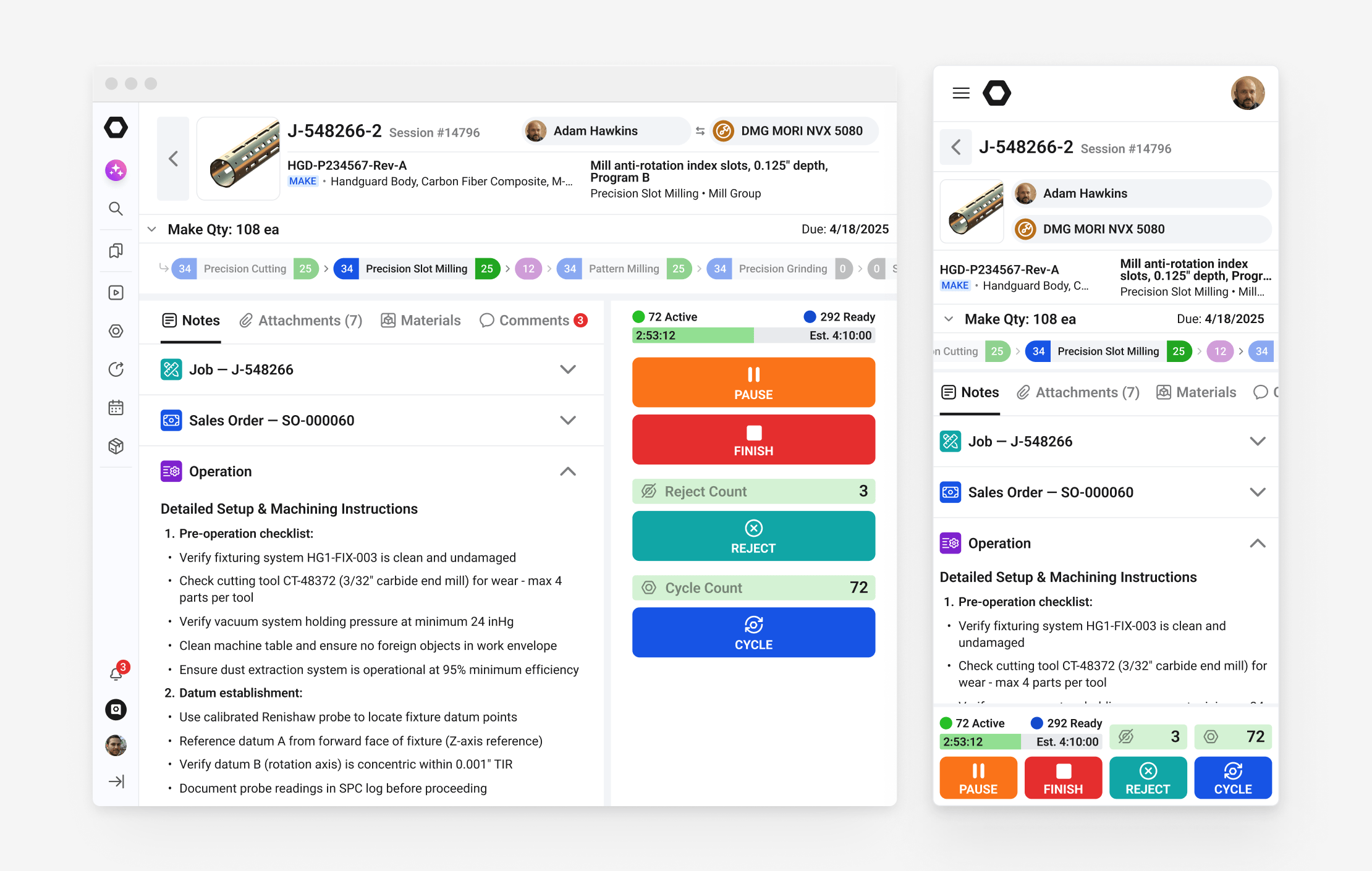
ERP UI/UX design for StartProto, a discrete manufacturing ERP
An AI-powered ERP for discrete manufacturing, used by planners, operators and auditors who each need a different view of the same real-time data. The work started as a UX redesign and continued into new features, the multi-role interface and the design system. A US client since 2022.

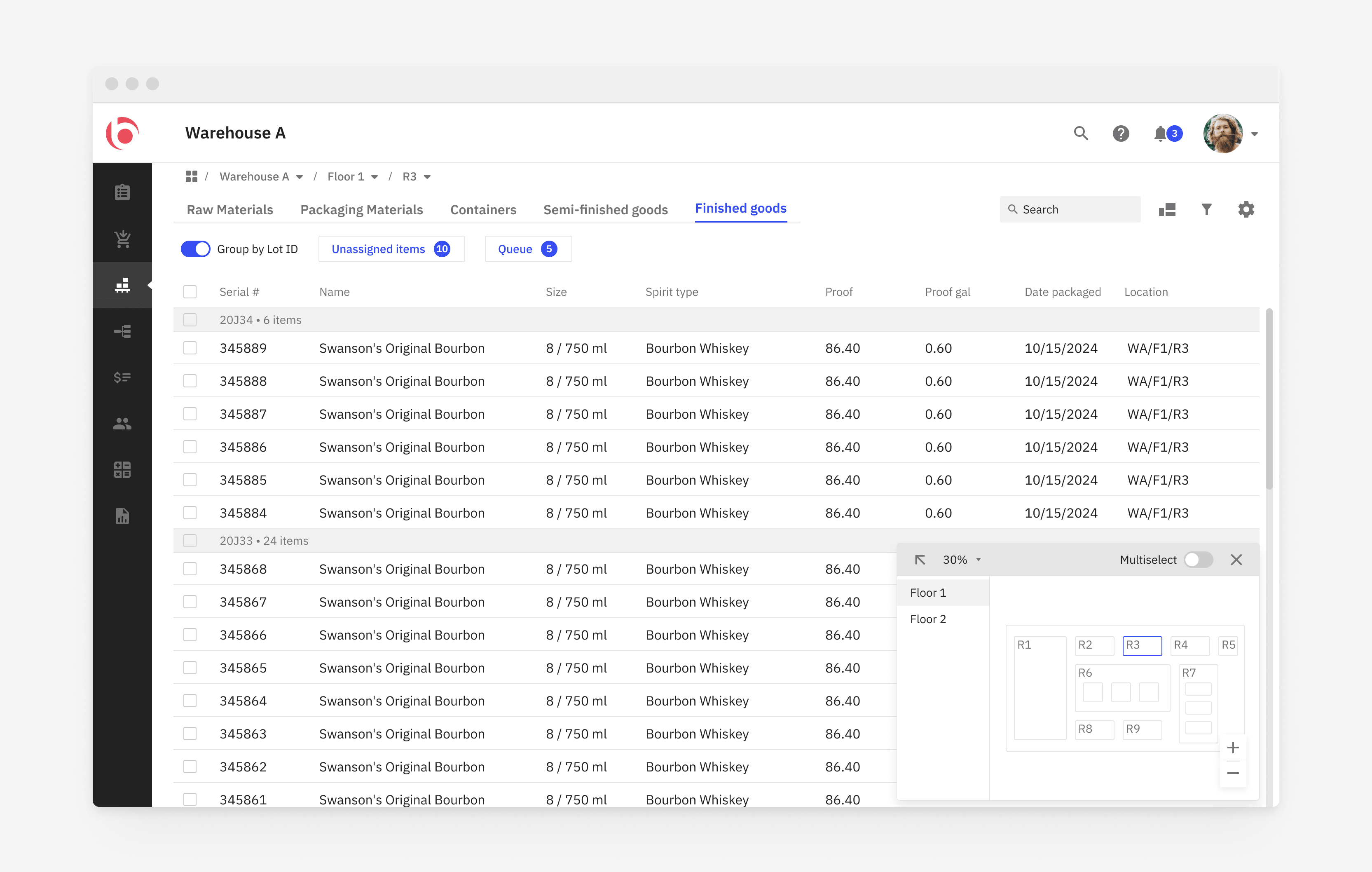
ERP UI/UX design for OnBatch, a batch processing ERP
Recipes, lots, inventory and compliance for distilleries, designed end to end. The clearest example of batch-mode interface work in the portfolio.

RFID warehouse app UI/UX design for OATSystems, a division of Checkpoint Systems
A handheld companion to an enterprise inventory platform, designed to stay intuitive while someone is walking a warehouse floor. Built around cycle counts across multiple sites and locating a single item by UPC, where a session lasts seconds.

Reported results after ERP UI redesign
The mix varies with the product, its stage and the market it sells into, so we agree what to measure before the work starts. These are what come up most often on an ERP.
Better ERP UI drives higher engagement
On the ERP platform we have designed since 2022, user engagement grew 3.7× over the course of the work. It is the measure closest to the design work, because it counts whether people use what was built rather than what they say about it.
Commercial results follow, with design as one input
That platform also reports 212% new client growth and a 3× increase in ARR across the engagement. Sales, pricing and the product itself moved those numbers alongside the interface, and we name it that way rather than claim the whole figure.
Transactions land while still accurate
Operators log work orders as production runs rather than saving them for the end of the shift. The data arrives in a state somebody can act on.
New modules land without new training
A module released later reuses patterns people already know, because it lands inside the system rather than beside it. The release note does the work a training session used to.
What ERP redesign does not fix
Where adoption is failing on pricing, a missing integration or a process the software was never going to change, an interface will not move it. We say so before a phase starts rather than after it.
Those guys did a fast sprint and delivered an intuitive daily-routine tool for warehouse workers.
ERP UI/UX design process, from onboarding to handoff
The ERP UI/UX design process is the same whether you are reworking a live system or building a new module from scratch. Each phase ends in artefacts you keep, and the pace follows your roadmap.
Modules, roles and technical constraints
We work from your technical documentation and the existing product, map the roles, the modules they touch and their critical flows, and review the technical constraints with your engineers. A shared Slack channel and an agreed cadence are live in week one.
Design cycles, in sprints or module by module
Iterative cycles cover the core screens, with options presented as argued trade-offs and the reasoning attached. We run inside your sprints, or against a fixed scope one module at a time. Each cycle produces user flows and an interactive prototype of the dense multi-role screens in scope, realistic from the first demo.
Data dense screens and the design system behind them
High-fidelity screens for dense, multi-role ERP interfaces arrive with the components and tokens that keep them coherent as engineering builds. States are documented, and the Figma structure is organised so your team can extend it alone.
A handoff your engineers can build from
A handoff detailed enough to implement dense ERP screens without guessing, carrying annotated specs and component notes. Your engineers reach us in Slack for the whole build, so questions do not wait for the next call. We review what gets built against the specs, and on a retainer the next module is in design while the previous one ships.
Why ERP UI/UX design takes domain knowledge
Most agencies can redraw an ERP screen. Being right about roles, routings and the record an auditor reads is the part that takes months to learn, and someone pays for those months either way.
We start on your screens in the first week
Someone has to pay for the weeks it takes to learn what a BOM is and why routings matter. That vocabulary is already ours, so the ramp does not land on your budget.
Data density is solved with hierarchy
Consumer patterns assume occasional users making low-stakes choices. Your users are captive, work in dense data and repeat every extra click thousands of times a week, so removing columns makes the job slower while looking simpler.
I’m confident we made a good choice in the company by working with Redbrix. They’ve done an outstanding job and stayed on point throughout the project.
What ERP software companies can check before hiring Redbrix
Everything below can be checked before you sign anything. How long clients stay, who does the work, what this agency works on daily, how design and engineering run together, and how the commercial side is structured.
Engagements measured in years
One ERP platform has had the same design team since 2022, across features, product design, the design system and a rebrand. Long engagements are how domain knowledge compounds.
Designers on the first call do the work
Redbrix has worked since 2017 with senior designers only, and the founders stay on the project. Nothing gets passed to a junior team once the contract is signed, and the people you meet stay on the work.
ERP software is the whole specialization
ERP and the operational platforms around it are what this design agency works on daily. Domain vocabulary and operational constraints are the starting point, so the learning curve is already behind us.
Engineering involved from the first day
Technical constraints are reviewed with your developers before design starts, and the same channel stays open through implementation. Designs that assume a rewrite get shelved, so the work runs against the data model you actually have.
Prices, terms and trial published upfront
Starting prices are on this page, and engagements run on Time & Materials or a retainer. Redbrix holds Top Rated Plus status on Upwork. Read our client reviews on Clutch. Clutch also lists the agency among its top UX agencies for manufacturing. We work remotely with teams across the US, UK, DACH, Benelux and the Nordics.
ERP UI/UX design pricing and what it costs
A UX audit, feature definition, interface design, the design system and continuing design capacity can be bought together or one layer at a time. Scope and system size drive the cost, so we publish where each format starts instead of a rate card. Exact scope and price are agreed on a call before anything starts.
3-day trial
Three working days on a bounded piece of work, agreed with you before it starts. No contract and no payment, so the work can be judged on your own product before a budget conversation begins. One per company, confirmed within two working days of a short call about the product.
UX audit from $1,900
A week on a set of screens, two on a full module, so a typical audit runs between $1,900 and $4,000 depending on scope. Findings map the key flows and check how each one is structured, mark where the interface is slower than the workaround, and set what to fix in what order.
Monthly retainer from $4,000
Continuous design capacity at an agreed cadence, billed monthly and adjustable as the roadmap changes. That is where a typical retainer starts, and larger blocks are priced from there. This is how most long ERP engagements run.
Project work, T&M or fixed price
A first phase on an ERP product typically runs three months and starts at $24,000. Where a specification or design documentation already exists, that phase can be quoted at a fixed price.
FAQ
At Redbrix, an ERP UI/UX design project ends with production-ready screens for the modules in scope, delivered with the design system behind them: components, tokens and usage rules. Handoffs carry annotated specs and component notes, detailed enough for your developers to implement without guessing.
ERP software has its own constraints. One record is read by several roles with different rights, a session on a shared terminal can last seconds, and audit data has to be captured inside the workflow while the work happens. For software outside ERP, Redbrix offers UI/UX design services for B2B companies.
Both. At Redbrix, feature work is part of a normal ERP engagement. Requests come from your customers, from you and from our team, and we work out what a feature has to accomplish and which roles it touches before anything gets drawn. On short engagements the scope stays at screen level, and we say so upfront.
The cost depends on scope and the size of the product. At Redbrix, a UX audit costs $1,900 to $4,000, a monthly retainer starts at $4,000, and a first project phase takes about three months and starts at $24,000. We agree the exact scope and price on a call.
For selected projects, Redbrix works on one bounded part of the ERP product for three working days. The trial is meant to show our approach on your actual product before a larger engagement is considered. Availability depends on the project and scope.
Yes. Redbrix redesigns ERP software that is already in production. We rework one module at a time against the data model you have, sequence changes to reduce retraining for the teams using it, and coordinate releases with your engineers. Each release is usable on its own.
Yes. Redbrix has designed two ERP products from zero, each as a whole product. Working from scratch means the module structure, the roles and the record model are decided with your team before anything is drawn. One of the two is not shown in the public portfolio.
Redbrix works with your developers directly, in a shared Slack channel that stays open for the whole build. Design sessions run in your sprint cadence, handoffs carry annotated specs and component notes, and implementation questions do not wait for the next scheduled call.
Yes. Redbrix works inside another team’s delivery as its design layer. Integrators and software partners bring us in for an ERP project, running under their process, their cadence and their client relationship. We can stay invisible to the end client or be introduced by name, whichever suits the account.
Redbrix built this service for founders and CTOs of companies that build ERP software and have no in-house design team. It also fits mature teams whose product outgrew its early interface decisions, and integrators who need a design team inside an ERP delivery. We work remotely with teams across the US, UK, DACH, Benelux and the Nordics.