UI/UX design for an outpatient clinic scheduling platform
Redbrix designed the UI/UX for an outpatient scheduling platform that connects referral intake, appointment booking, patient records and clinical documentation across a clinic network. Front-desk staff, clinicians and radiologists work in one product, with referral details and patient context carried from booking through report signing.
About client
The client runs a network of outpatient centers with multiple locations, rooms, services and specialists. Front-desk staff, clinicians and radiologists all take part in the path from referral to signed clinical report.
Industry
Healthcare / Outpatient clinic software
Services we provided
– UX research and competitive analysis
– Product architecture
– UI/UX design
– Product architecture
– UI/UX design
Challenge
Scheduling across multiple locations, rooms, services and specialists already goes beyond a standard booking tool.
The deeper problem was disconnected data. Referral details had to be re-entered by the time the clinician needed them, and the patient history a radiologist reads before signing a report was stored elsewhere.
The deeper problem was disconnected data. Referral details had to be re-entered by the time the clinician needed them, and the patient history a radiologist reads before signing a report was stored elsewhere.
Solution
We designed one connected path from referral to clinical record. A referral from the intake queue opens into the booking form, and the confirmed appointment goes into the schedule.
At check-in, the referral and clinical context are already in the patient record. The radiologist signs the report in the same record where the booking started.
At check-in, the referral and clinical context are already in the patient record. The radiologist signs the report in the same record where the booking started.
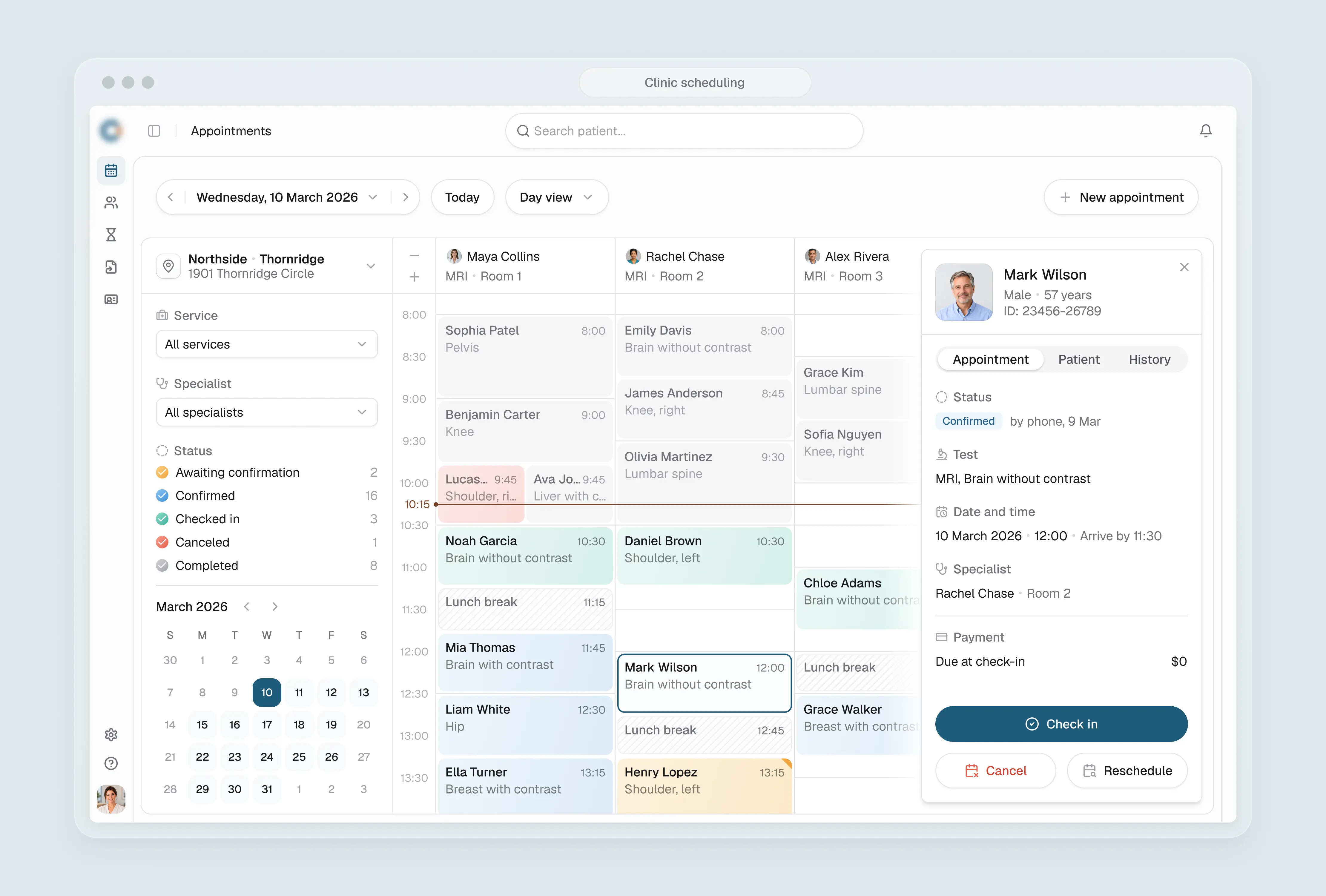
Referral-driven booking workflow for outpatient scheduling
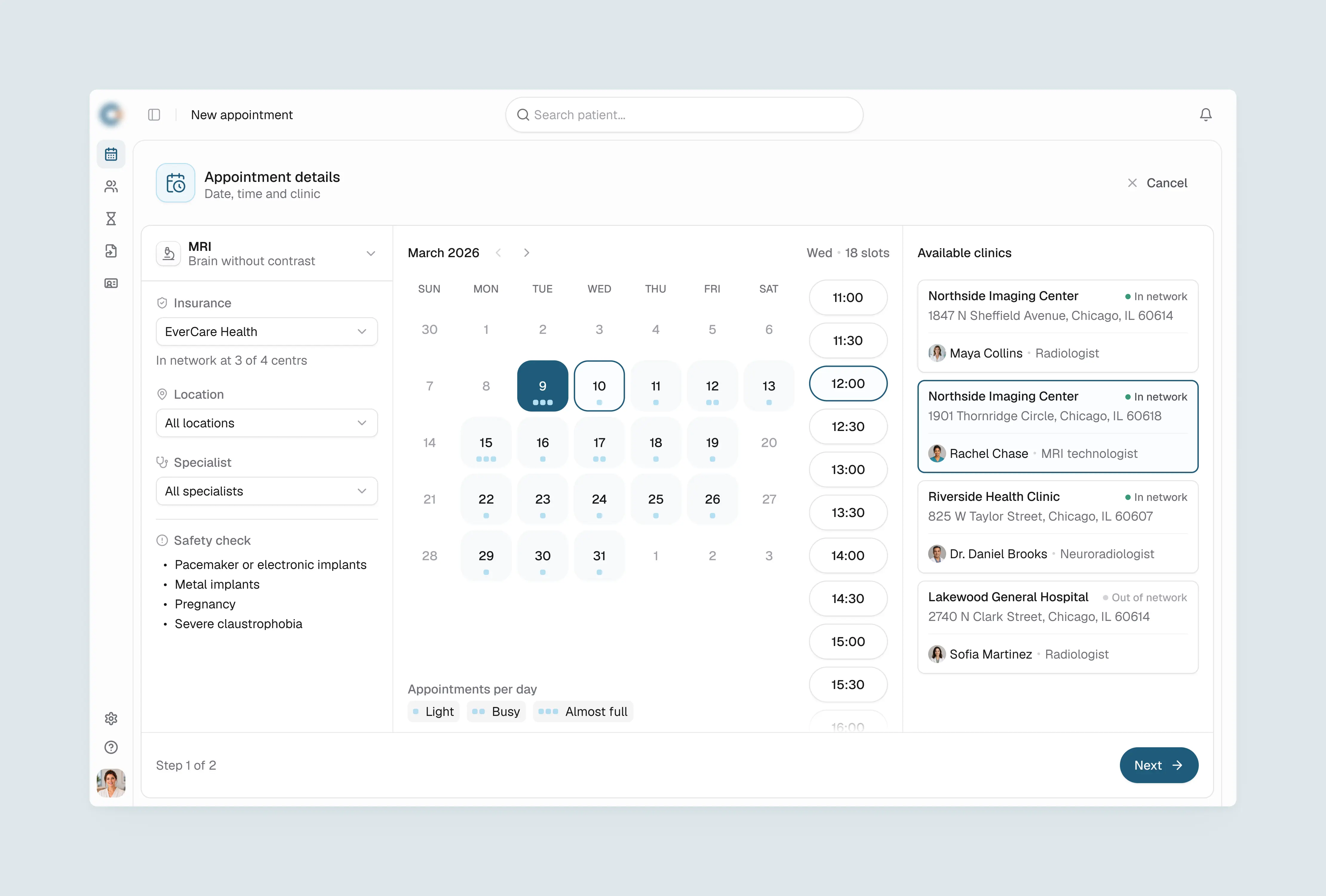
Front-desk staff need to confirm the right time, location and provider without switching screens. We designed the booking flow to start from the referred service.
Insurance coverage and safety requirements are confirmed inline. Clinic availability is shown with network status and the assigned specialist in the same step.
Insurance coverage and safety requirements are confirmed inline. Clinic availability is shown with network status and the assigned specialist in the same step.
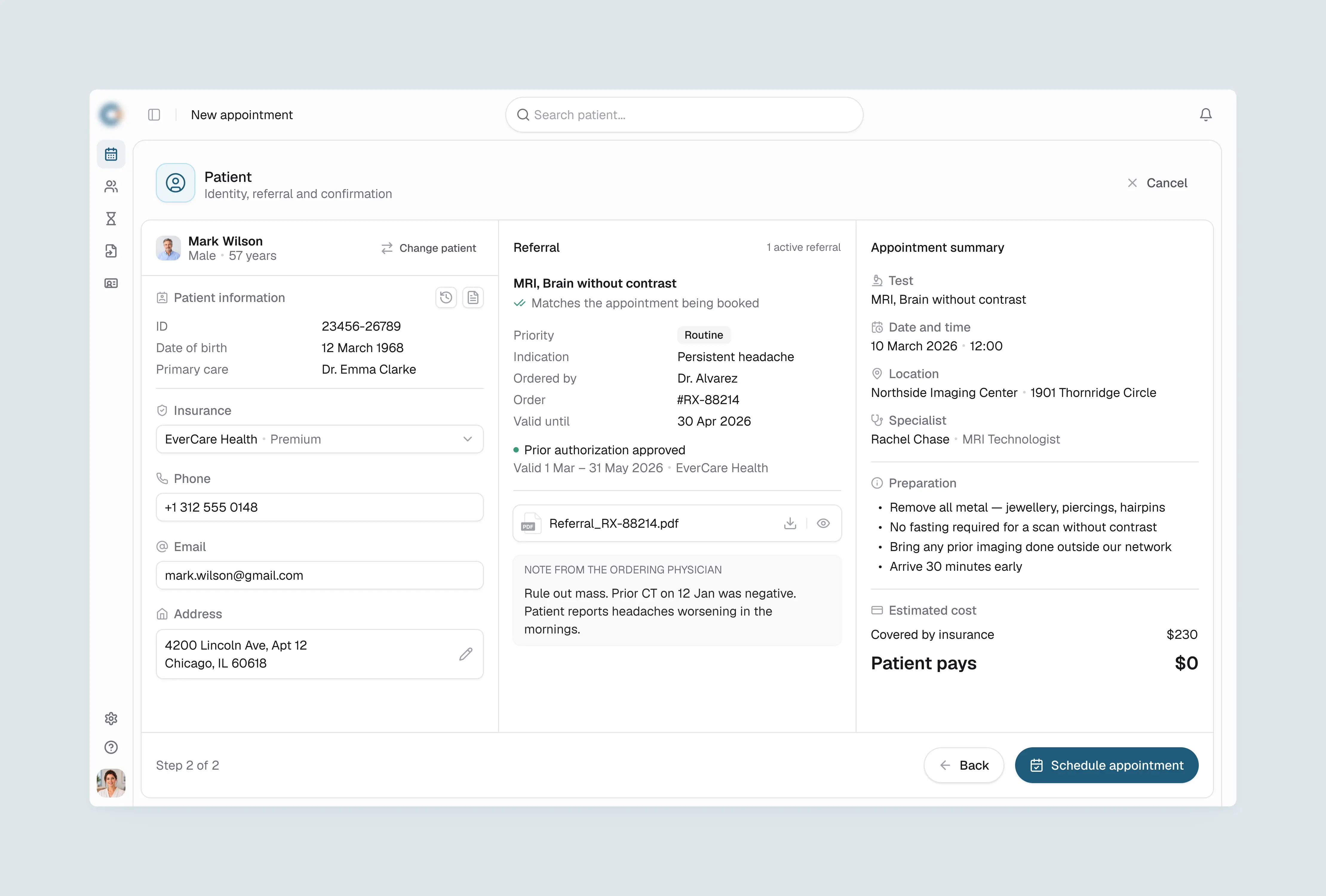
Referral matching and appointment confirmation in one view
Before confirming a booking, staff need to check that the referral covers the service. The second step of the form shows patient identity, the matched referral and the appointment summary side by side.
The referral is matched to the booked service automatically and shows authorization status, the ordering physician's note and the validity window. Preparation instructions and estimated cost appear in the summary column, so staff can complete or correct the appointment without leaving the form.
The referral is matched to the booked service automatically and shows authorization status, the ordering physician's note and the validity window. Preparation instructions and estimated cost appear in the summary column, so staff can complete or correct the appointment without leaving the form.
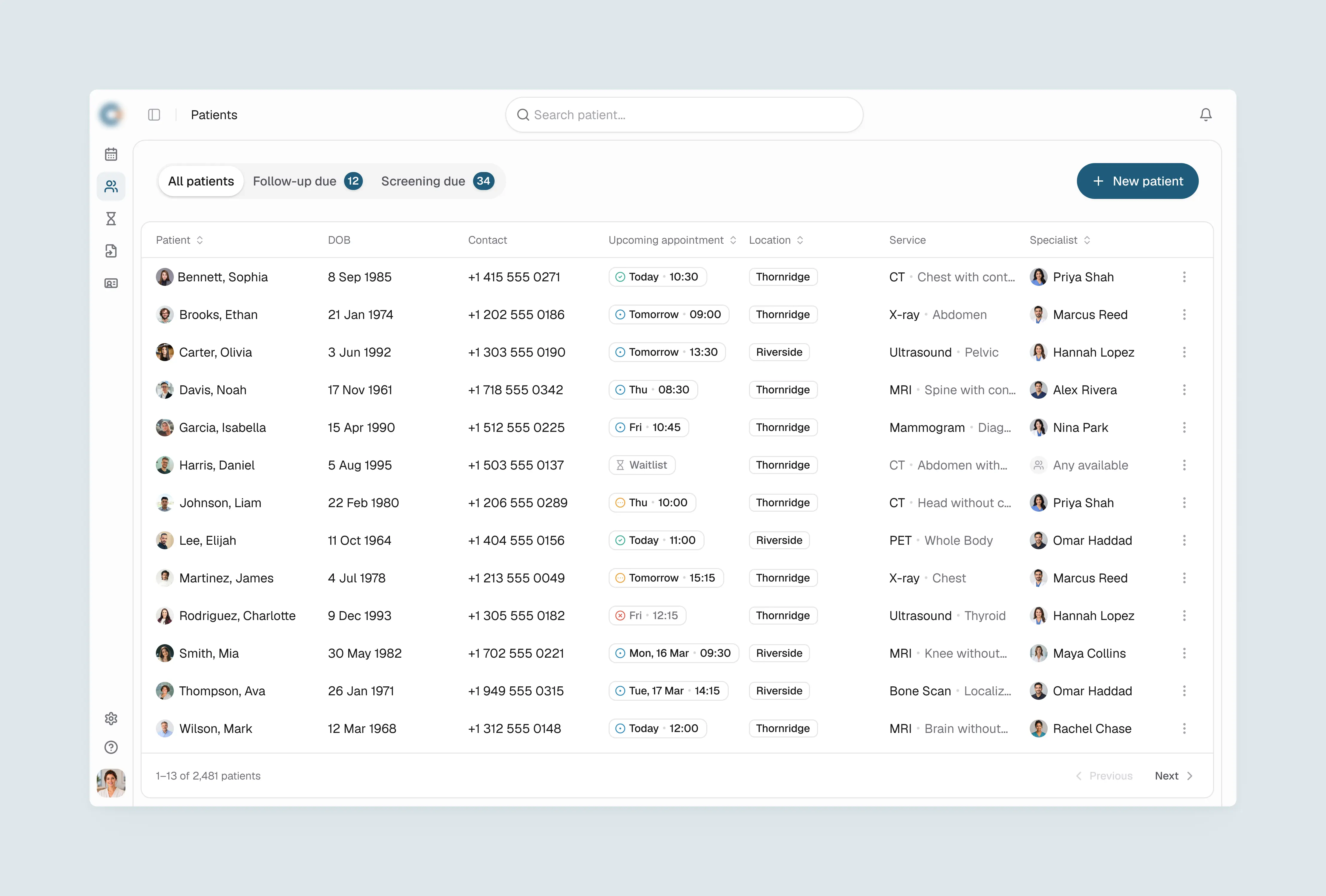
Patient list design with proactive follow-up and screening queues
Patients who need outreach are easy to miss in a standard directory. Alongside the main patient list, the design adds two action queues: Follow-up due, for patients with a radiologist's recommendation that hasn't led to a new booking, and Screening due, for patients overdue for a routine exam.
Each row shows who needs to be contacted and why, with the upcoming appointment, location and assigned specialist visible without opening the record. Waitlisted patients appear inline with their status.
Each row shows who needs to be contacted and why, with the upcoming appointment, location and assigned specialist visible without opening the record. Waitlisted patients appear inline with their status.
Patient record UX for clinical context at point of care
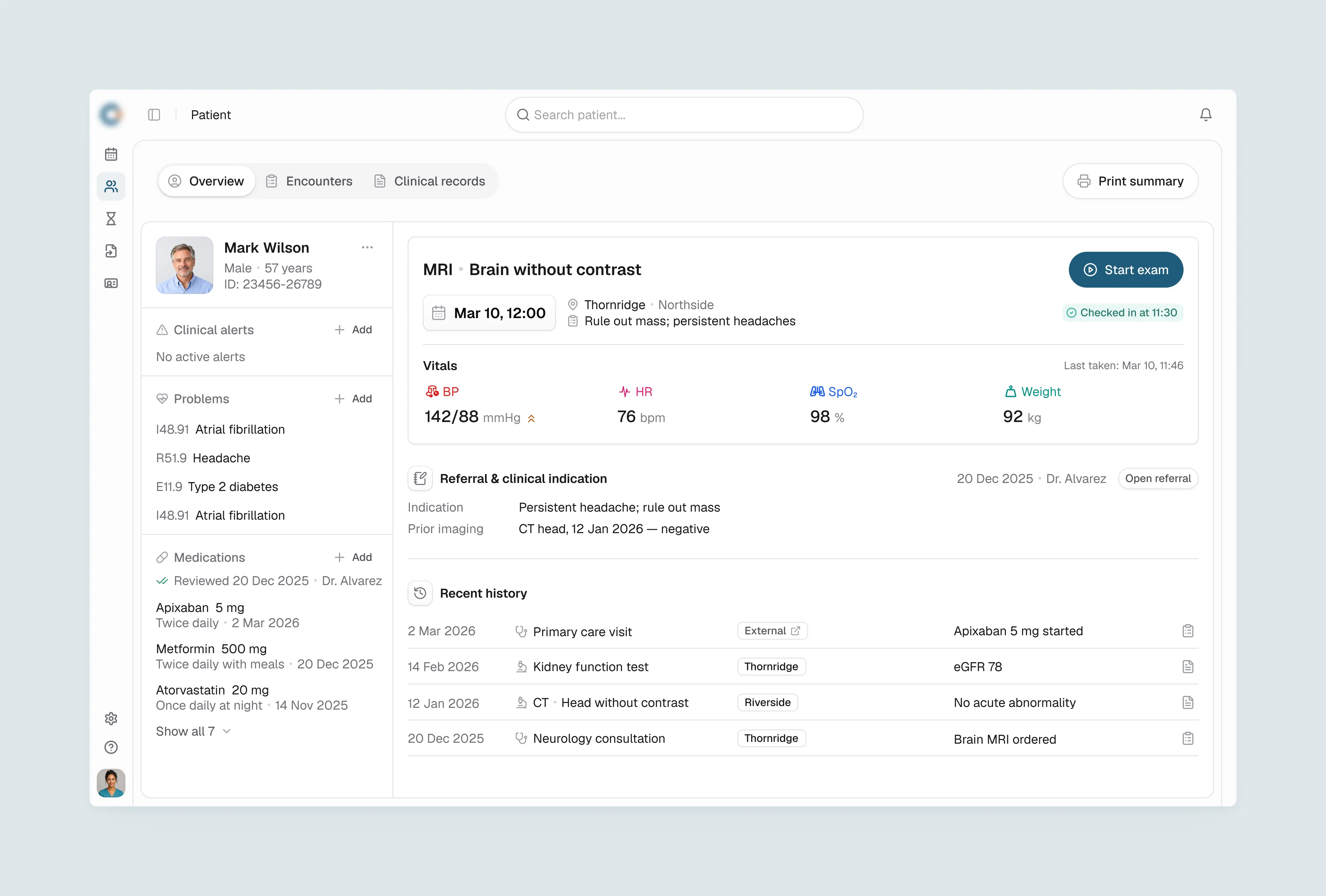
Before an exam, the clinician needs to know why the patient is here and what happened before. The patient overview brings together active problems with ICD codes, current medications reviewed by the referring physician, and today's appointment with check-in status and vitals.
The referral and clinical indication sit next to the recent history, so no tab switching is needed. The clinical team opens the same record the front desk used to confirm the booking.
The referral and clinical indication sit next to the recent history, so no tab switching is needed. The clinical team opens the same record the front desk used to confirm the booking.
Clinical records UI/UX for structured exam documentation
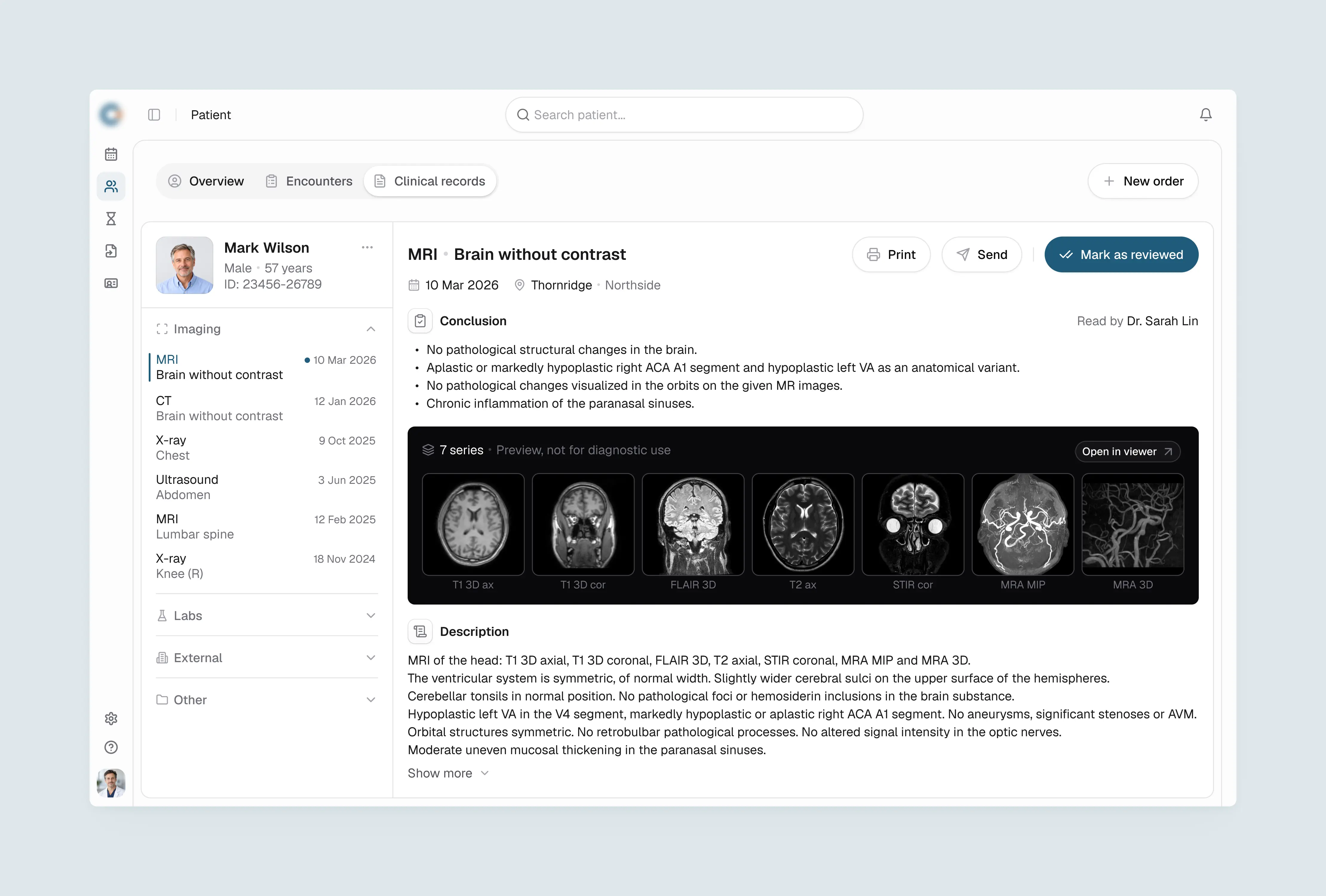
Clinicians compare findings across exams, so the diagnostic history needs to be in one place. Results are grouped by type: imaging, labs, external and other, with the current exam open by default.
Each report follows the reading order clinicians already use: conclusion first, then image series with series labels, then the full description. Prior studies are available from the left panel for comparison across exams and modalities without leaving the patient record.
Each report follows the reading order clinicians already use: conclusion first, then image series with series labels, then the full description. Prior studies are available from the left panel for comparison across exams and modalities without leaving the patient record.
Outcome & Impact
For the front desk, the design turns a referral into a confirmed appointment within one workflow. The referral queue, the booking form and the schedule are connected, and authorization and safety checks stay on record through check-in.
For the clinical team, the record opened at check-in already contains the referral, the indication and prior imaging. The radiologist reviews and signs the report in the same record, with image series and patient history in view.
Explore our UI/UX design services for complex B2B products.
Explore our UI/UX design services for complex B2B products.